A procedural planet editor for building a base shape with nodes, sculpting it non-destructively, and rendering it through a sparse GPU SDF.
2026
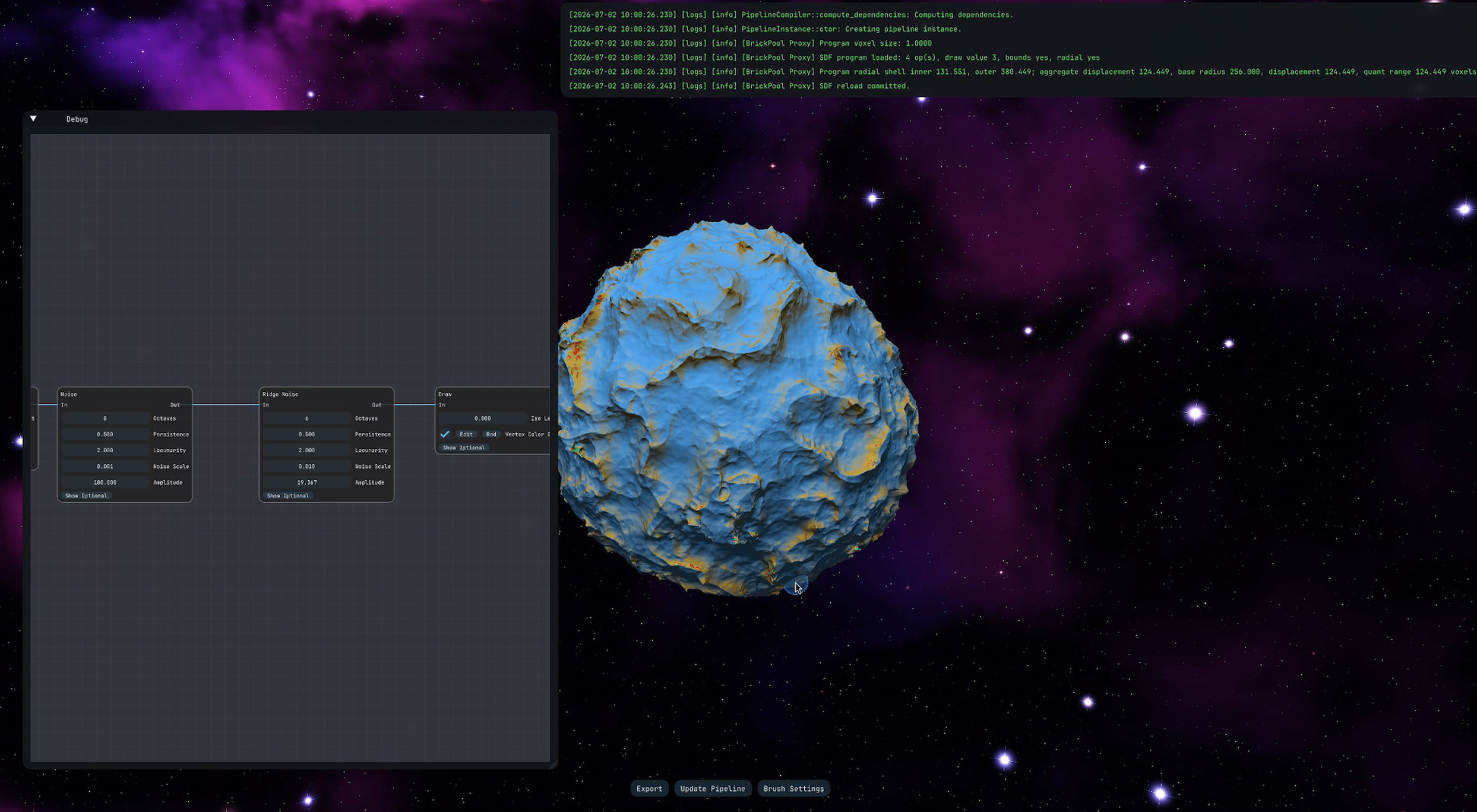
Poly-Gone Spheres
Poly-Gone Spheres is a procedural planet editor I designed and built alongside the Aurora
engine during my 20-week graduation project. A node graph creates the planet's starting shape,
after which you can sculpt it non-destructively and see the result update in the viewport. The
same procedural definition and edit history can then be saved as a volume or extracted as a
conventional mesh.
The name began as a joke about removing polygons through subtractive sculpting. Halfway
through the project I replaced the mesh-based viewport with raymarching, so the editor had
quite literally become “poly-gone.” That pivot also shaped the rest of the architecture:
instead of repeatedly rebuilding a large mesh, the editor now updates only the sparse SDF
bricks touched by a procedural or sculpting change.
The node graph defines the repeatable base shape; sculpting adds an ordered, non-destructive layer on top.
How the renderer evolved
The final renderer was not the starting point. I changed representation several times as
editing cost, memory use, and planet scale exposed different bottlenecks. Each version left
something useful behind, even when its central approach was replaced.
One dense volume, one mesh
The first version stored the entire signed-distance field in one dense 3D texture and
regenerated one mesh from it. It was straightforward, and allowed me to quickly test the
prototype, but even a small edit could trigger a large amount of meshing work and a lot of
undesired slow-down.
Chunked mesh generation
I divided the same dense texture into chunks and generated a mesh per chunk. Vertex and
index data lived in sub-slices of large static buffers, compute work compacted the visible
chunks, and one indirect draw submitted them. Local edits became cheaper, but meshing was
still substantial and the dense texture imposed a fixed memory ceiling: the planet could
use neither significantly less memory nor grow beyond the allocation.
Raymarch the dense field
I then tried rendering the distance field directly. Raymarching was slower while the scene
was idle, but edits became nearly free because there was no mesh to rebuild, just a 3d
texture update. For an editor where changes are frequent and can cover large regions, that
was the more useful tradeoff.
Make the SDF sparse
Sparse storage solved the remaining memory problem. Surface bricks are allocated from
bindless 3D texture blocks only when needed, so an empty region costs metadata rather than
a full-resolution volume. This made larger planets practical without reserving one
enormous texture up front.
From chunk proxies to one planet proxy
My first sparse renderer drew an instanced cube for every resident chunk in one call. It
worked, and was certainly faster than the previous raymarcher, but isolated cubes created
overdraw and rear-side chunks were still rasterized. A single planet-scale proxy proved
simpler: each ray stops at the first surface, so the rear half never needs to produce a
separate proxy draw.
Skip empty space hierarchically
Finally, hierarchical DDA traversal added coarse chunk and macrocell skipping before
walking individual bricks. SDF sampling now begins only after the ray reaches populated
storage, which is important when most of a planet's bounding volume is empty.
Current architecture
The editor separates build-time node generation, CPU-side authoring and bookkeeping, and
GPU-side volume generation and rendering. That separation lets the expensive parts move to
background work without making the editable graph or sculpt history depend on renderer
resource lifetimes.
The visual editor writes YAML. The runtime validates its links and types, removes unused work, and produces an executable SDF program.
3Sculpting · CPU
Plan sparse updates
An ordered sculpt journal and BVH identify affected bricks while background work updates residency and builds the next frame plan.
4Generation · GPU
Regenerate dirty bricks
Render-graph passes upload compact jobs and evaluate only the procedural program and edits needed by each dirty brick.
5Viewport · GPU
Skip to the surface
A planet-scale proxy starts the ray, then hierarchical DDA traversal skips empty chunks and bricks before SDF sampling begins.
6Output · CPU
Preserve or extract the result
Volume export preserves the pipeline and journal; background extraction samples the same result into an indexed GLB mesh.
Aurora and Poly-Gone Spheres
Aurora provides the engine boundary
Aurora supplies the application lifecycle, render graph, rendering hardware interface,
bindless resources, synchronization, transfers, shader compilation, and shared threading
facilities. Poly-Gone Spheres uses those systems instead of owning another renderer beneath
its editor.
Poly-Gone Spheres owns the planet workflow
PGS owns the visual node language, pipeline compiler, sparse SDF layout, sculpt journal,
residency decisions, generation and raymarching passes, picking, and export. Those parts
would remain project-specific even if the underlying engine changed.
I developed both during the same graduation project. The standalone Aurora Engine case study covers the engine itself
in more detail and reflects a slightly newer version than the one used at the end of this project.
Two systems worth a closer look
Make editable graphs safe to execute
The node system turns a visual, user-editable graph into a validated program. Generated types
keep the editor, serialization, registration, and executor in agreement, while the compiler
rejects broken connections before they can reach generation work.
The sparse SDF system combines brick allocation, ordered edits, spatial pruning, background
planning, and GPU traversal. Together they limit regeneration and rendering to the parts of
the volume that can actually matter.
Sculpt strokes are stored as ordered union or subtraction operations instead of being baked
irreversibly into voxels. Undo and redo can therefore change the active history, and a brick
can be regenerated at another resolution by replaying the procedural program and only the
edits that overlap it.
A sculpt changes the journal immediately; background planning and GPU generation update the affected sparse bricks.
For reusable procedural content, volume export stores the pipeline and sculpt history. For
conventional asset pipelines, background CPU extraction samples the same result into an
indexed GLB mesh. The full recording below shows node editing, live regeneration, sculpting, and export in one video.
The complete editor workflow, from procedural graph to sculpted and exported result.